
Infini, a stablecoin neobank, now supports USDT0 deposits via the Conflux eSpace network. For users, this opens a direct path from on-chain USDT0 to everyday financial services: once deposited into Infini, funds can be used for card payments, transfers, and yield. And with eSpace transaction fees below $0.00001 and confirmation in seconds, this is now one of the most cost-effective ways to move USDT into Infini.
The integration adds to a growing set of venues where USDT0 on Conflux is already live — exchanges including Kraken, KuCoin, and MEXC; and payment networks such as AlchemyPay, Bitunion and AEON — and extends that reach into personal financial services.
This article provides an overview of the Infini platform, followed by a step-by-step user guide.
About Infini
Infini is a stablecoin neobank headquartered in Hong Kong, serving users in most countries and regions worldwide (excluding Mainland China and sanctioned jurisdictions). In essence, it functions as an account built on stablecoins: users deposit USDT or USDC and can then spend, transfer, or earn yield on their balance, subject to local laws and regulations. The platform is offered in two editions, Personal and Business.
Infini Personal
Infini Personal is designed for individual users worldwide, with registration requiring only an email address or Google account. Its core features include:
-
Deposits and withdrawals: USDT and USDC are supported across all major networks, with USDT0 on Conflux eSpace as the latest addition. All deposits are consolidated into a single USD balance;
-
Card payments: After completing KYC, users can apply for a prepaid card issued on the Visa/Mastercard network, add it to Apple Pay, Google Pay, Alipay, or PayPal, and spend at millions of merchants worldwide, with no conversion fee between stablecoins and USD. Card availability varies by region; current fees and coverage are listed on the official site;
-
Fiat on- and off-ramps: Virtual bank accounts are provided through partner banks — Lead Bank in the US for USD (supporting ACH and wire transfers), and Banking Circle in Europe for EUR and GBP (supporting SEPA, FPS instant payments, and CHAPS). Incoming fiat can be converted to stablecoins automatically;
-
Transfers: Transfers between Infini users settle instantly with no on-chain fees. Withdrawals to external on-chain addresses and crypto gifts are also supported;
-
Yield: Features such as the EasyEarn allow balances to earn an indicative APY. It should be noted that these products deploy assets on-chain; they are not bank deposits, are not covered by deposit insurance, and returns fluctuate with market conditions;
-
Security: Google Authenticator 2FA, withdrawal address whitelisting, recovery codes, and email notifications, with a published security audit report.
Registration is available at https://www.infini.money/. Users are advised to enable Google Authenticator and store their recovery codes securely before making any transactions.
Infini Business
Infini Business serves companies and teams with cross-border payment needs. Key capabilities include:
- Payment acceptance: Support for stablecoins, major wallets, and Binance Pay, with stablecoin acquiring fees of 0.2%–0.4% depending on plan, and card acquiring fees of 3.9%–4.1%;
- Multi-currency collections: Payment acceptance in 8 major fiat currencies — USD, EUR, GBP, JPY, HKD, SGD, AUD, and KRW;
- Payouts: Batch transfers to multiple countries and regions, bill pay, approval workflows, and compliance documentation;
- Corporate cards: Zero fees on USD spending, with FX fees starting from 1% on foreign-currency transactions;
- Developer API: Full documentation is available at https://developer.infini.money/.
Rates and coverage are subject to change; the Business page on the Infini website reflects the latest terms. The remainder of this guide focuses on the Personal edition.
User Guide
The overall flow consists of three steps: deposit USDT0 into Infini, use the balance (card payments or yield).
Before You Start
You will need:
- A wallet that supports Conflux eSpace (MetaMask, Rabby, OKX Wallet, and Fluent are all compatible), holding USDT0;
- An Infini account with registration and security setup completed;
- A small amount of CFX for gas. With eSpace transaction fees below $0.0001, even a minimal balance will last a long time.
Two points deserve particular attention:
- eSpace, not Core Space. The Conflux network comprises two spaces: Core Space (addresses beginning with cfx:) and eSpace (addresses beginning with 0x). Infini supports eSpace only — ensure your wallet remains on the eSpace network and uses a 0x address throughout;
- The correct token. The official USDT0 contract address on Conflux eSpace is 0xaf37e8b6c9ed7f6318979f56fc287d76c30847ff. Verify it before sending to avoid depositing the wrong asset.
Step 1: Deposit Into Infini
- Log in to Infini and select Deposit on the dashboard page;
- Choose Crypto — transfer from an external wallet or exchange;
- Select Conflux eSpace as the network and USDT0 as the asset;
- Copy the deposit address or scan the QR code, and review the deposit notice at the bottom of the page, which specifies the accepted assets, minimum deposit amount, and other terms. Then send the transfer from your wallet. Before confirming, verify three items: the network is Conflux eSpace, the token is USDT0, and the address matches the one displayed by Infini (comparing the first and last six characters is recommended). The deposit address recognizes only its designated asset; sending any other token may result in permanent loss;
- Once submitted, the deposit can be tracked under Transaction History. Funds typically arrive within a few minutes, an email confirmation is sent, and the amount is credited to your USD balance.

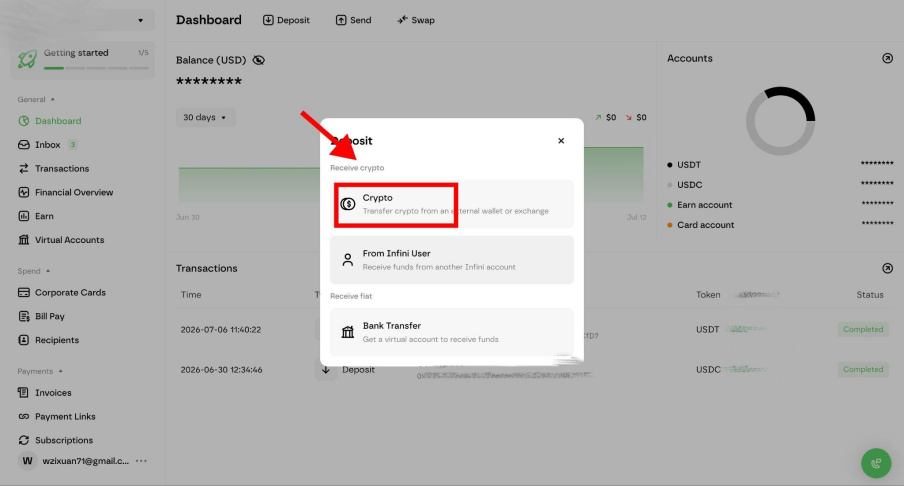

For a first deposit, we recommend testing the full flow with a small amount (for example, 10 USDT0) and confirming arrival before transferring larger sums. Blockchain transactions are irreversible, and funds sent to the wrong network or address may not be recoverable.
Step 2: Using Your Balance
Once the deposit arrives, the USD balance has two primary uses, which can be combined.
Option 1: Card payments
- Complete KYC/KYB verification within Infini;
- Open the corporate card page and apply for a virtual card (issued on the Visa/Mastercard network; certain tiers carry a one-time issuance fee, as shown on the page);
- Once issued, the card can be added to Apple Pay, Google Pay, Alipay, or PayPal for use online and at supported in-store merchants;
- Purchases are deducted directly from the USD balance with no stablecoin conversion fee, and earn up to 1.5% cashback. From the merchant’s perspective, the card functions like any standard bank card.

Card tiers, fees, and regional availability are as stated on the official Infini page. Due to legal requirements, applications from certain restricted regions may be declined.
Option 2: Earning yield — up to 8% APY
- Deposited balances can earn yield through Infini’s earning features, such as the EasyEarn; some activate automatically upon deposit, with no additional steps required;
- Yield accrues daily at up to 8% APY. The balance remains fully available for card payments and transfers while earning, and funds can be deposited or withdrawn at any time.

Please note that an indicative APY does not represent guaranteed returns. These products are not bank deposits and are not covered by deposit insurance; both principal and returns may fluctuate with market conditions. Review the product terms and assess the risks before subscribing.
FAQ
Q1: How does USDT0 relate to USDT? USDT0 is the unified multi-chain version of USDT, issued within Tether’s official framework, with 1 USDT0 always equal to 1 USDT. Within Infini, it is displayed as USD balance and functions identically.
Q2: What happens if I send from a Core Space (cfx:) address or via the wrong network? Infini supports Conflux eSpace only (0x addresses). Sending via a Core Space address or the wrong network will result in a permanent loss of funds that cannot be recovered. Always confirm your wallet is on the eSpace network before sending.
Q3: Are there minimum amounts or fees for deposits and withdrawals? On-chain gas fees are charged by the Conflux eSpace network and are negligible. Infini’s own minimums and fee rules are displayed in real time in the deposit notice on the deposit and withdrawal pages, which should be treated as authoritative.
Q4: How does keeping funds on Infini differ from keeping them in my own wallet? A self-custodial wallet gives you full control of your private keys. Infini is a custodial platform: funds are managed by the platform in exchange for conveniences such as card payments and yield. Users may allocate funds according to their needs; enabling 2FA and the withdrawal whitelist on Infini is strongly recommended.
Links
- Infini website: https://www.infini.money/
- Infini Help Center: https://help.infini.money/
- USDT0 official bridge: https://usdt0.to/
Disclaimer: This article is a product overview and user guide. It does not constitute investment advice, and nothing in it should be read as a promise of returns. Digital assets carry price, technical, and regulatory risks. The features, fees, and coverage described here are subject to change, and availability may depend on the laws and regulations of your jurisdiction. Always refer to the official Infini and Conflux pages for the latest information and assess the risks independently.